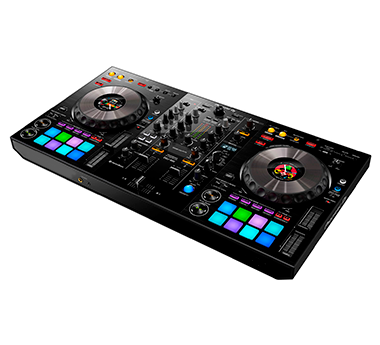
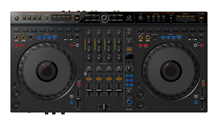
AlphaTheta XDJ-AZ DJ Controller

2
DJ Controller

ID: ZM105839

AlphaTheta
AlphaTheta XDJ-AZ DJ Controller
3.099 €

In stock

Estimated delivery: Wednesday, 19 August

Accumulate discounts for your card

Best price on the market

lojaIcon
VIEW STORE STOCK
1
Pagamentos
View all options and shipment methods

Complete your purchase!

AlphaTheta XDJ-AZ DJ Controller
3.099 €
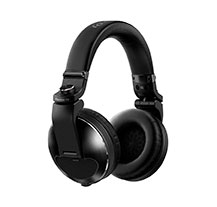
Pioneer HDJ-X10-K Headphones
359 €
AlphaTheta XDJ-AZ DJ Controller
3.099 €
AlphaTheta Wave-Eight Battery Speaker
806 €
AlphaTheta XDJ-AZ DJ Controller
3.099 €
Pioneer VM-70 Black Studio Monitor
199 €

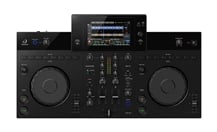
Club-level DJ experience with the feeling of total control

The XDJ-AZ inherits the layout and feel of the flagship CDJ-3000 and DJM-A9 to give you an intuitive experience. When you perform on the system, it feels as if you’re at one with the decks, allowing for more creative performances.


With full-size jog wheels that feel just like those on the CDJ-3000, pitch bending and scratching on the XDJ-AZ are incredibly smooth. The mixer section inherits the intuitive layout of the DJM-A9, with all controls positioned to maximize playability. And it features user-friendly buttons for assigning Beat FX to help you express yourself through the music. So, when you’ve mastered the XDJ-AZ, you’ll be familiar with the way club-standard equipment works and feels, making it much easier to perform at your best in clubs.

Features

Hardware Unlock

check_circle_outline
The XDJ-AZ is a Hardware Unlock device. Simply plug the XDJ-AZ into a PC / Mac running the rekordbox application and you can use the software.

Serato DJ Pro

check_circle_outline
Simply plug the XDJ-AZ into a PC / Mac running the Serato DJ Pro application and you can use the software.

3 USB ports

check_circle_outline
Perform back-to-back with another DJ and hand over smoothly thanks to the 3 USB inputs (2 top-loading for USB devices and 1 laptop connection).

rekordbox Link Export

check_circle_outline
Play tracks directly from your PC/Mac or mobile device by connecting via a USB cable, LAN cable, or wireless connection.

Performance Pads

check_circle_outline
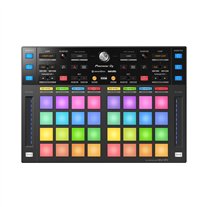
Hit the 8 back-lit rubber Performance Pads to trigger Hot Cues, Beat Loop, Slip Loop and the Beat Jump.

Gate Cue

check_circle_outline
Experiment with your pad play using Gate Cue, which plays the music from the cue point only when you press the pad. Take your finger off the pad and the music stops instantly, and silently returns to the cue point.

Easy to carry

check_circle_outline
Be ready to play at a moment’s notice. The single-unit design with grab handles makes carrying and setup easy.

High-quality audio

check_circle_outline
The mic input circuit produces crystal-clear sound, even with a high input level.

Firmware Update Manager

check_circle_outline
You’ll be automatically notified when firmware updates become available.

AlphaTheta Care

check_circle_outline
Our extended product warranty service ensures longer and more reliable use of your products. Click here for details.
Specifications
AlphaTheta XDJ-AZ DJ Controller
Miscellaneous
Capacidade de frequência aos -3 dB.
Frequency Range
20 Hz - 20 kHz (USB)
Indica a relação sinal-ruído ou razão sinal-ruído (frequentemente abreviada por S/N ou SNR, do inglês, signal-to-noise ratio e RSR em português) da Saída de Audio do instrumento.
S/N Ratio
115 dB (USB)
Total Harmonic Distortion (THD)
0.0018 % (USB)
Compatible Software
rekordbox for Mac/Windows, rekordbox for iOS/Android, Serato DJ Pro
Information concerning the accessories included at the time of purchase: AC adaptor, (guitar) picks, tuner, user manual or others.
Accessories
Power cord, Quick Start Guide, Precautions for use, Warranty (for some regions)
External Dimensions (D x W x H)
895 × 504.1 × 133.4 mm / 35.24” × 19.85” × 5.25”
Peso do equipamento.
Weight (main unit only)
13.5 kg / 29.8 lbs.
Terminals
Indica o tipo e/ou quantidade de entradas do equipamento. As entradas podem ser de áudio (conexões variadas), MIDI, digitais, etc.
Input(s)
LINE / PHONO × 2 (RCA) MIC × 2 (XLR & 1/4” TRS jack)
Output(s)
MASTER × 2 (XLR × 1, RCA × 1) BOOTH × 1 (1/4” TRS jack) PHONES × 2 (1/4” stereo jack × 1, 3.5 mm stereo mini jack × 1)
Indica se o equipamento permite ligação USB e/ou qual o seu tipo.
USB
USB Type-A × 2 USB Type-C × 1
Botões de controlo para trabalhar nas opções do equipamento.
Other
LAN port (100BASE-TX) × 1
Wireless LAN
Indica a quantidade de padrões disponíveis no equipamento. O visor " Pattern" dá acesso a um Gravador MIDI em Loop com 16 Pistas e 8 secções acessíveis através dos botões de 8 Cenas. Os dados do padrão podem ser manipulados de forma não destrutiva, com ca
Patterns
IEEE 802.11 a / b / g / n / ac
Indica o tipo e a banda de frequências em que o produto trabalha, normalmente medidas em Hertz (Hz). Geralmente associado à sistemas sem fios. Quanto mais alto o valor da banda de frequências, maior o número de canais possíveis, diminuindo assim o risco d
Frequency Band
2.4 GHz / 5 GHz
Bluetooth
Recetor de sinal sem fios.
Wireless Receiver
Bluetooth ver. 5.3
Compatible Codecs
SBC, AAC
SonicLink
Indica o tipo e a banda de frequências em que o produto trabalha, normalmente medidas em Hertz (Hz). Geralmente associado à sistemas sem fios. Quanto mais alto o valor da banda de frequências, maior o número de canais possíveis, diminuindo assim o risco d
Frequency Band
2.4 GHz
Performance Control
Indica o número, ou tipo/especificação, de canais do equipamento.
Channels
4
Indica quantos canais se podem controlar no painel de controlo da mesa de mistura.
Deck Control
4 (USB Storage Device) / 4 (DJ Software Control)
Referente ao prato giratório.
Jog Wheel
Referente ao prato giratório.
Jog Wheel
Com a função Sound Colour FX pode seleccionar o efeito que deseja utilizar e depois activar o efeito rodando o botão "colour" sob o canal onde deseja aplicar o efeito, pode rodá-lo no sentido dos ponteiros do relógio para focar as frequências mais agudas
Sound Color FX
・DUB ECHO ・NOISE ・SWEEP ・FILTER ・SPACE ・CRUSH
A função Beat FX é um pouco mais avançada, uma vez que há mais configurações por onde escolher. Primeiro, decidir qual o efeito que se deseja utilizar. Depois, decidir a que canal se pretende aplicar o efeito e, em seguida, a intensidade do efeito desejad
Beat FX
・DELAY ・ECHO ・PING PONG ・SPIRAL ・REVERB ・TRANS ・FILTER ・TRIPLET FILTER ・FLANGER ・PHASER ・ROLL ・TRIPLET ROLL ・HELIX ・MOBIUS